Yarbo Robot Mower
I spent a few weeks testing the Yarbo robot mower, and while the hardwired setup is intense, its app customization and modular attachment system make it a powerful year-round yard tool.
- Automatically returns to its wireless charging pad to recharge and resume mowing.
- App allows deep customization for blade height, mowing patterns, and obstacle sensitivity.
- Can be driven manually via the app or with an included Xbox-style physical controller.
- Modular base station accepts attachments like a snowblower, leaf blower, and trimmer.
- Lengthy, invasive setup process requiring drilling through walls for a wired GPS antenna.
- Struggled with thick, overgrown grass on the first pass, missing several patches.
- Edge cutting performance was poor around flower beds and landscaping ledges.
- Cut Height
- 2 in to 4 in
Yarbo Robot Mower
Amazon · Check current price · As an affiliate we may earn from qualifying purchases.
Overview
One of the absolute best things about living with modern technology is that I can be standing outside, talking to a camera, while a machine handles mowing my lawn at the exact same time. The Yarbo robot mower is easily one of the coolest electric vehicles I've tested, but it is much more than just a lawn mower. It operates as a modular base station designed to take over your most tedious outdoor chores year-round.
If you've followed my testing for a while, you might remember that about four months ago, I reviewed this exact same base unit equipped with its snowblower attachment. Swapping to the mower deck transforms it for summer duty, but getting to the point where a robot does all your yard work requires a serious initial commitment.
Before you can just press start and walk away, there is a very physical, hands-on setup process to get this system communicating correctly. It is not an out-of-the-box solution, but rather a permanent piece of smart home infrastructure.
Real-World Performance
I let my grass get quite thick and overgrown before sending the Yarbo out for its first run, and that proved to be a tough test. I set it to a diagonal checkerboard pattern, and as it made its first pass, it definitely struggled with the sheer volume of grass. It left a few noticeable patches untouched and missed a strip entirely near a tricky ledge in my front yard.
I also noticed that the edges near my flower beds didn't get cut well. This was partially my fault; the mower was bumping into my flowers during the perimeter mapping, so I adjusted the boundary inward. Because of that safety buffer, the Yarbo left a border of tall grass that I will just have to deal with manually using a trimmer.
Yarbo explicitly recommends running the mower twice for a clean cut, so I sent it out for round two, and the results looked significantly better. The mower successfully mulched the thick clippings left over from the first round, and there were virtually no high areas left in the middle of the lawn. If you have a massive yard and the Yarbo runs out of battery before finishing, it automatically stops, navigates back to its wireless charging station, and resumes its job once it is fully charged.
Design & Build Quality
The build quality of the Yarbo unit itself is robust, but the infrastructure you have to build around it is surprisingly permanent. First, I had to run an Ethernet cable from my indoor router out to the external GPS unit. Because my router is in my office, I had to grab a tape measure, figure out exactly where I needed to drill through the wall, and physically fish the line outside into my garage. From there, I ran the cable along the garage wall, drilled another hole, and threaded the cord completely outside.
Yarbo recommends placing the GPS unit a few feet away from the house to ensure it connects with satellites overhead. I staked mine about three feet from the edge of my cement pad. Once the GPS was secured, I set up the docking station. I was very impressed by how well the provided screws held the charging pad securely in place, and the power cord connects with a satisfying lock that lights up blue to confirm a solid connection.
For manual operation, Yarbo includes a physical remote that looks and feels exactly like an Xbox controller. It is incredibly comfortable to hold, letting you start the blades by pulling the triggers or adjust the blade height on the fly. If you just want to sit inside and play Yarbo like a video game, the hardware supports it perfectly.
Key Features
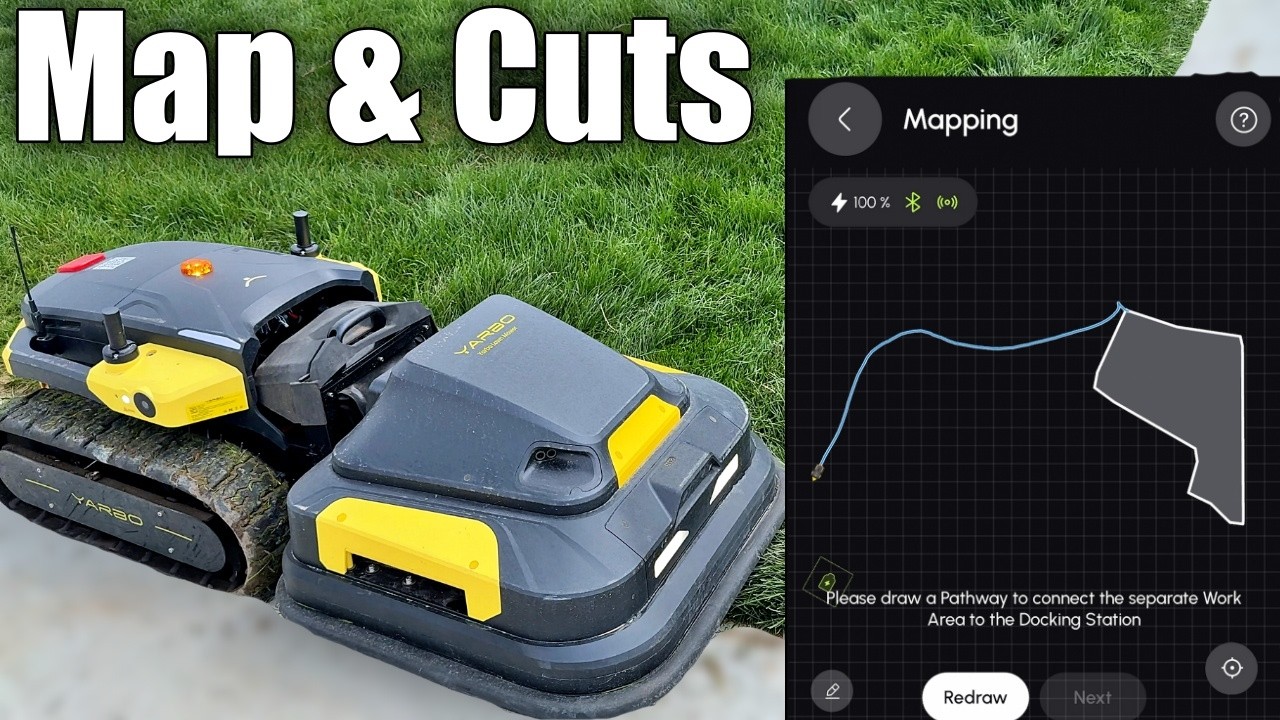
The Yarbo app is where the real magic happens, offering a massive amount of customization once your hardware is installed. To finish the initial setup, I had to back the Yarbo onto its pad using the app controls and hit verify. The mower then takes about two minutes to scan the immediate area, checking for debris to ensure it has a clean entryway to its dock.
Mapping the yard requires you to manually drive the Yarbo around the outside perimeter of your lawn, which is surprisingly fun. Once the perimeter is set, the app opens up a wealth of parameters. You can adjust the obstacle avoidance sensitivity, set the blade height anywhere from 2 to 4 inches, and choose your exact mowing pattern, ground clearance, and turning style.
You also have granular control over how it tackles the perimeter. You can choose whether it mows the center or the edges first, and you can push the boundary line out to catch missed grass or pull it toward the center to protect delicate landscaping. Beyond the app, the standout feature of Yarbo is its expanding attachment ecosystem; they recently released an articulating edge trimmer arm and a leaf blower to complement the core modules.
Who It's For
I'd recommend the Yarbo to tech-savvy homeowners who want a true year-round automated yard assistant and do not mind investing serious time into a permanent installation. The heavy upfront labor pays dividends over time with hands-free mowing.
If you have a relatively open yard and love the idea of using one robotic base station to mow in the summer and blow snow in the winter, this is an incredibly capable system. It handles routine maintenance beautifully once your boundaries are dialed in.
Who Should Skip It
If you have complex landscaping, lots of delicate flower beds, or you regularly let your grass grow extremely long between cuts, I would skip this setup. The edge trimming leaves a lot to be desired, and it struggles heavily on the first pass in deep grass.
Furthermore, the complicated installation involving drilling through exterior walls to route Ethernet cables will be a dealbreaker for anyone wanting a quick solution. It requires a level of DIY comfort that not every homeowner wants to tackle.
How It Stacks Up
Compared to traditional robotic mowers that require you to bury perimeter wires around your entire property, the Yarbo's GPS-guided mapping is a major upgrade. You can easily adjust your boundaries in the app instead of digging up your yard every time you change a garden bed.
However, when stacked against some of the newer, purely vision-based mowers hitting the market, Yarbo's reliance on a hardwired external GPS antenna makes the initial setup far more demanding. Its primary advantage in the segment remains its heavy-duty modularity; very few robots can transition from mowing thick grass to blowing deep snow on the exact same drive base.
Final Verdict
The Yarbo is a highly impressive, versatile machine that successfully frees you from the chore of pushing a mower. The wireless charging, app customization, and modular attachments make it a standout piece of technology for your yard.
However, you have to be willing to tackle an invasive setup process and accept that it requires two passes to get a truly clean cut. Because it leaves a wide buffer around obstacles, you will still need a manual string trimmer to handle the edges it leaves behind.
Does the Yarbo mower come with a physical remote control?
Yes, you can control the Yarbo using the app on your phone or with an included physical controller that looks and functions exactly like an Xbox controller.
How does the Yarbo handle long, thick grass?
In my testing, it struggled on the first pass with long, thick grass and missed several spots. Yarbo explicitly recommends running the mower twice for a clean, even cut.
What is the cutting height range of the Yarbo mower?
You can easily adjust the blade height from 2 inches up to 4 inches directly in the Yarbo app.
Does the Yarbo robot automatically return to its base to charge?
Yes, if the Yarbo runs out of battery before finishing your yard, it will autonomously drive back to its wireless charging station, recharge, and then resume mowing.
Can the Yarbo robot do anything besides mow the lawn?
Yes, the Yarbo is a modular system. In addition to the mower deck, I have tested its snowblower attachment, and they also offer newly released leaf blower and edge trimmer attachments.